Users
Fractal Server's user model and authentication/authorization systems are powered by the FastAPI Users library, and most of the components described below can be identified in the corresponding overview.
fractal_server.app.models.security.UserOAuth
Bases: Base
ORM model for the user_oauth database table.
This class is a modification of
SQLAlchemyBaseUserTable
from fastapi_users_db_sqlalchemy.
Original Copyright: 2021 François Voron, released under MIT licence.
Note that some class attributes (e.g is_active, is_verified and
is_superuser) are the default ones from fastapi-users - see
https://fastapi-users.github.io/fastapi-users/latest/configuration/schemas.
| ATTRIBUTE | DESCRIPTION |
|---|---|
id |
TYPE:
|
email |
TYPE:
|
hashed_password |
TYPE:
|
is_active |
If this is
TYPE:
|
is_superuser |
TYPE:
|
is_verified |
If this is
TYPE:
|
oauth_accounts |
TYPE:
|
profile_id |
Foreign key linking the user to a
TYPE:
|
project_dirs |
Absolute paths of the user's project directory. This is used (A) as
a default base folder for the |
slurm_accounts |
List of SLURM accounts that the user can select upon running a job. |
- Reference Code Index Index security Classes UserManager
- Reference Code Index Index Index Index _aux_auth Functions: _get_single_user_with_groups
Source code in fractal_server/app/models/security.py
First user
To manage fractal-server you need to create a first user with superuser privileges.
This is done by means of the init-db-data command together with the--admin-email/--admin-pwd/--admin-project-dir flags, either during the startup phase or at a later stage.
The most common use cases for fractal-server are:
- The server is used by a single user (e.g. on their own machine). In this case you may simply use the first (and only) user.
- The server has multiple users, and it is connected to one or more SLURM clusters. To execute jobs on a SLURM cluster, a user must be associated to that cluster and to a valid cluster-user via its
Profile(more details here).
Authentication
Login
An authentication backend is composed of two parts:
- the transport, that manages how the token will be carried over the request,
- the strategy, which manages how the token is generated and secured.
Fractal Server provides an authentication backend (Bearer), based on the JWT strategy, which produces the /auth/token/login/ route.
FastAPI Users provides the
logoutendpoint by default, but this is not relevant infractal-serversince we do not store tokens in the database.
Bearer
The Bearer transport backend provides login at /auth/token/login
Authenticated calls
Once you have the token, you can use it to identify yourself by sending it along in the header of an API request. Here is an example with an API request to /auth/current-user/:
OAuth2
Fractal Server also allows a different authentication procedure, not based on the knowledge of a user's password but on external OAuth2 authentication clients.
Through the httpx-oauth library, we currently support OpenID Connect (aka OIDC), GitHub and Google (and more clients can be readily included).
Configuration
To use a certain OAuth2 client, you must first register the fractal-server application (see instructions for GitHub and Google).
During app registration, you should provide two endpoints:
- the
Homepage URL(e.g.http://127.0.0.1:8000/), - the
Authorization callback URL(e.g.http://127.0.0.1:8000/auth/github/callback/, wheregithubcould be any client name).
and at the end of this procedure, you will kwnow the Client ID and Client Secret for the app.
Note: You have to enable the "Email addresses" permission for your GitHub registered app, at https://github.com/settings/apps/{registered-app}/permissions. A similar setting may be required for Google.
To add an OAuth2 client, you must provide valid OAuthSettings variables:
When fractal-server starts with proper OAuthSettings, two new routes will be generated:
/auth/{OAUTH_CLIENT_NAME}/authorize/,/auth/{OAUTH_CLIENT_NAME}/callback/(theAuthorization callback URLof the client).
Note that the
OAUTH_REDIRECT_URLenvironment variable is optional. It is not relevant for the examples described in this page, since they are all in the command-line interface. However, it is required when OAuth authentication is performed starting from a browser (e.g. through thefractal-webclient), since the callback URL should be opened in the browser itself.
Authorization Code Flow
Authentication via OAuth2 client is based on the Authorization Code Flow, as described in this diagram
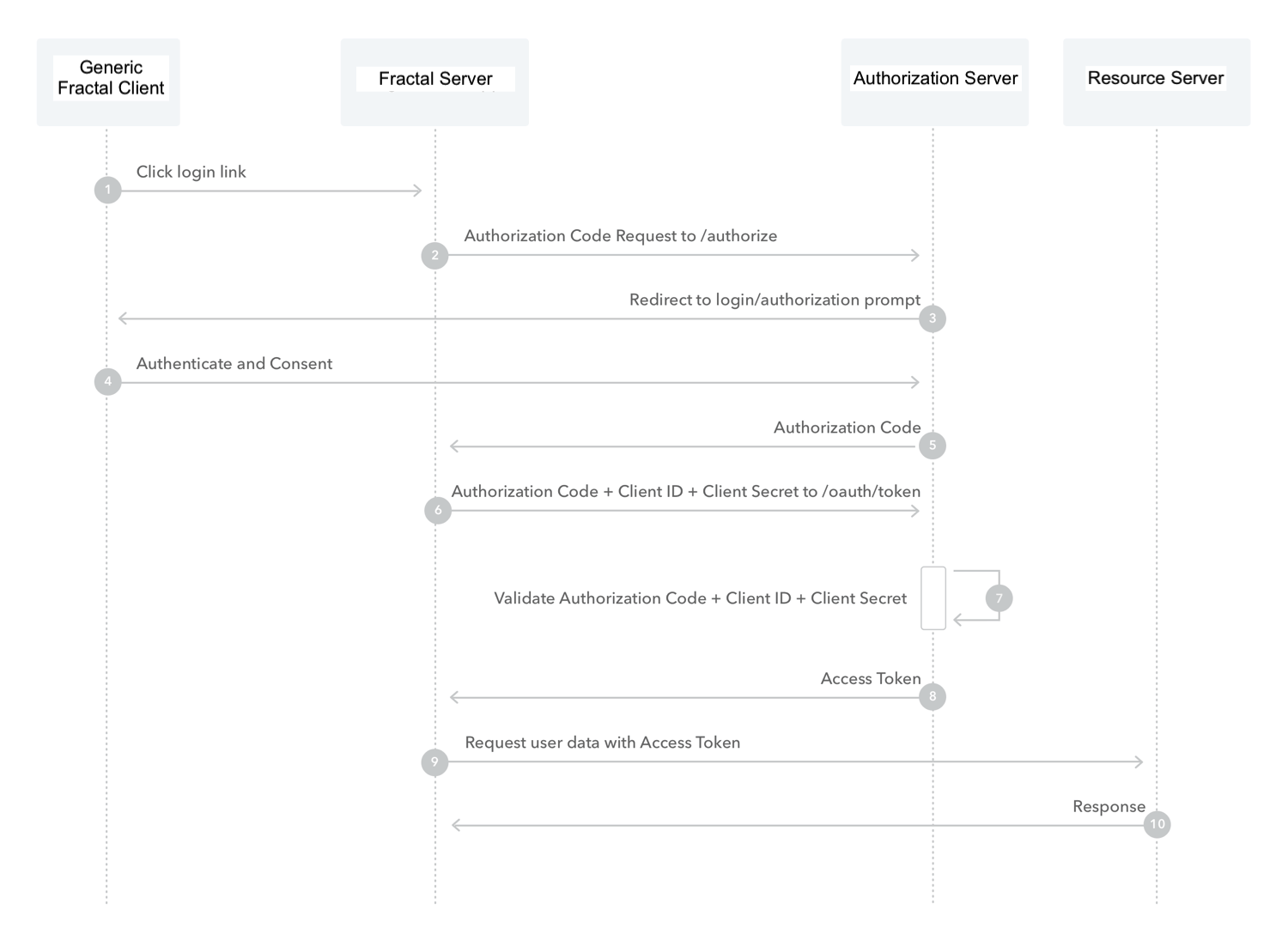
(adapted from https://auth0.com/docs/get-started/authentication-and-authorization-flow/authorization-code-flow, © 2023 Okta, Inc.)
We can now review how fractal-server handles these steps:
-
Steps 1 → 4
- The starting point is
/auth/client-name/authorize/; - Here an
authorization_urlis generated and provided to the user; - This URL will redirect the user to the Authorization Server (which is e.g. GitHub or Google, and not related to
fractal-server), together with astatecode for increased security; - The user must authenticate and grant
fractal-serverthe permissions it requires.
- The starting point is
-
Steps 5 → 8
- The flow comes back to
fractal-serverat/auth/client-name/callback/, together with the Authorization Code. - A FastAPI dependency of the callback endpoint,
oauth2_authorize_callback, takes care of exchanging this code for the Access Token.
- The flow comes back to
-
Steps 9 → 10
- The callback endpoint uses the Access Token to obtain the user's email address and an account identifier from the Resource Server (which, depending on the client, may coincide with the Authorization Server).
After that, the callback endpoint performs some extra operations, which are not strictly part of the OAuth2 protocol:
- It checks that
stateis still valid; - If the user has never authenticated with
OAuth2before:- it adds to the database a new entry to the
oauthaccounttable, properly linked to theuser_oauthtable; at subsequent logins that entry will just be updated. - it sends a notification of the login to the addresses indicated in
FRACTAL_EMAIL_RECIPIENTS.
- it adds to the database a new entry to the
- It prepares a JWT token for the user and serves it in the Response Cookie.
Full example
A given fractal-server instance is registered as a GitHub App, and fractal-server is configured accordingly:
There is a single user, created with the command
Now the user wants to log in using her GitHub account associated to the same email.
First, she makes a call to /auth/github/authorize/:
Now the authorization_url must be visited using a browser.
After logging in to GitHub, she is asked to grant the app the permissions it requires.
After that, she is redirected back to fractal-server at /auth/github/callback/, together with two query parameters:
The callback function does not return anything, but the response cookie contains a JWT token
The response cookie can be found using the developer tools of the browser, inspecting the response on the network page.
The user can now make authenticated calls using this token, as in
Authorization
On top of being authenticated, a user must be authorized in order to perform specific actions in fratal-server:
/api/alive/is public, and accessible without authentication./auth/current-user/endpoints (including/auth/current-user/profile-info/) require authentication and the user must be active.GET /current-user/allowed-viewer-paths/requires that the user is both active and verified.
/api/v2/endpoints require authentication, and the user must be active and verified and they must have a non-nullprofile_id.- Active superusers can access all
/admin/and/auth/endpoints.